

Internal links connect pages on your website. Build useful paths from important pages to relevant guides and next steps, using crawlable links and descriptive text. Start with a small page inventory, find pages without incoming links, and repair the relationships that help a reader finish a task.
On this page
- Start with five pages a customer actually needs
- Draw a forward path, then add the missing context
- Use a real link and clear anchor text
- Find pages with no useful incoming route
- Keep navigation and contextual links working together
- Repair links when a URL or page purpose changes
- Verify the change as a first-time visitor
- Sources & further reading
Start with five pages a customer actually needs
A useful internal linking strategy begins with page relationships, not a target number of links.
For a hypothetical kitchen-remodeling business, consider this small inventory:
| Page | Example path | Its job |
|---|---|---|
| Homepage | / |
Introduce the business and important services. |
| Kitchen service | /services/kitchen-remodeling |
Explain who the service is for and what it covers. |
| Budget guide | /guides/kitchen-remodel-cost |
Explain the actual factors a customer must discuss when budgeting. |
| Planning guide | /guides/kitchen-remodel-timeline |
Explain the business's preparation and scheduling process. |
| Estimate request | /request-estimate |
Let a suitable customer ask for a project assessment. |
These paths illustrate a relationship; they are not pages on WhiteGloveAEO or a report about a real contractor.
The important planning question is: what does someone need next after reading this page? Someone on the service page may need the budget guide before requesting an estimate. Someone arriving directly on the planning guide may first need to understand the service.
Draw a forward path, then add the missing context
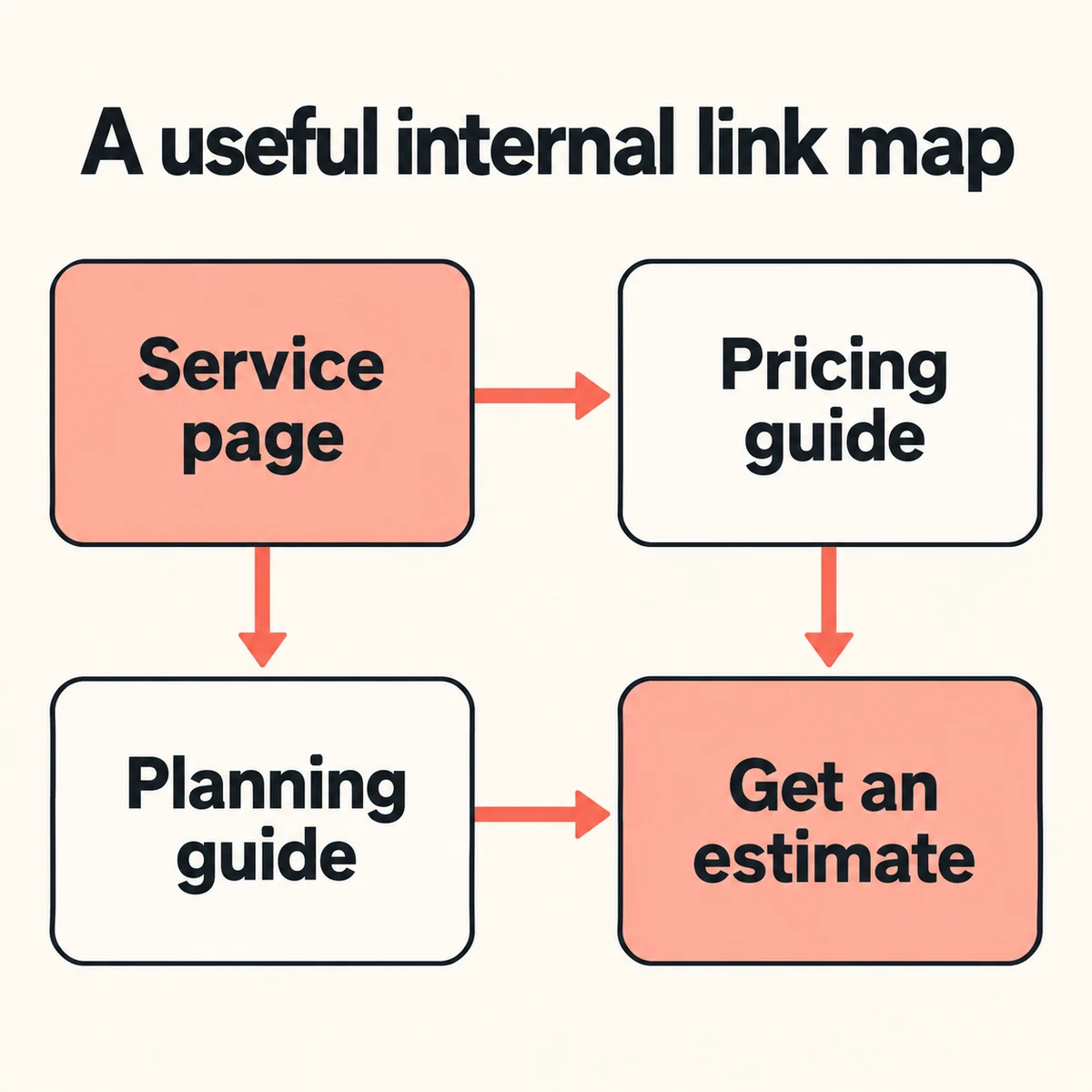
Illustrative main paths: the service page leads to pricing and planning guidance, and both guides lead to a relevant estimate step. This is a navigation example, not a diagram of ranking gains.
The image shows only the main forward paths. It does not mean that a guide should omit a relevant link back to the service, or that every reader must follow one funnel.
Turn those relationships into actual edits:
| From | Link to | Useful place for the link |
|---|---|---|
| Homepage | Kitchen service | Within the service navigation or introduction. |
| Kitchen service | Budget guide | Where the page explains how project scope affects the discussion. |
| Kitchen service | Planning guide | Where a reader needs to understand the process before contacting the business. |
| Budget guide | Estimate request | After explaining what information the customer should gather. |
| Planning guide | Kitchen service | Where the guide refers to what the company actually offers. |
| Planning guide | Estimate request | After the preparation steps and relevant limits. |
The link earns its place through that surrounding explanation. A row in this plan is not a reason to insert an unrelated link into every paragraph.
Use a real link and clear anchor text
Google's link best practices recommend crawlable anchor elements with href attributes and descriptive text.
For the example site, a normal HTML link could be:
<a href="/guides/kitchen-remodel-timeline">
  See our kitchen project planning guide
</a>
An ordinary link supplied by a CMS is usually all the author needs. The point is that it has a real destination; a styled button that depends only on an arbitrary click handler is a different implementation.
Now compare the writing:
- Vague: “For more information, click here.”
- Useful: “Before requesting an estimate, review the kitchen project planning guide.”
- Forced: “Read our kitchen remodeling kitchen renovation project timeline planning guide.”
The useful version describes the destination within a sensible sentence. It does not need to repeat every keyword variation.
Use anchor text that fits the passage. If you refer to the same page from several places, natural variations are fine; do not turn every occurrence into the same awkward exact-match phrase.
Find pages with no useful incoming route
An orphan page is a page with no incoming internal links in the inventory you are examining. A manually saved URL or a sitemap entry can make a page seem discoverable to its owner while ordinary navigation never leads there.
For a small site, you can investigate without a large crawler:
- Export or list the intended public pages from the publishing system.
- Include pages in the inventory even if you already suspect they are orphaned.
- Start at the homepage and follow ordinary navigation and contextual links.
- For each important page, record at least one real page that links to it.
- Check the source and destination while signed out.
- Investigate every inventory entry with no recorded incoming route.
Do not use only the list you discovered by following links: that would miss precisely the unlinked pages you are trying to find.
For the hypothetical site, the result could be:
| Page | Incoming route found | Decision |
|---|---|---|
| Kitchen service | Homepage service link. | Keep the route clear. |
| Budget guide | None. | Link from the relevant pricing discussion on the service page. |
| Planning guide | Only a link in an old email. | Add a useful public route; email is not an internal page link. |
| Estimate request | Main navigation and planning guide. | Check that both arrive at the intended form. |
Those are example findings, not observations from an actual customer site. Use your own inventory to decide what needs repair.
Keep navigation and contextual links working together
Navigation helps a reader orient within the website. A contextual link helps with the specific question raised by the current sentence or section. A related-reading block offers a useful continuation after an article.
They serve different moments in the journey. Putting every article in the main menu can make navigation harder, while leaving everything to a generic footer may hide the relationship.
Our recommendation for a small publication is to give each useful article:
- A route from an appropriate topic or archive page.
- A contextual reference from related content when the relationship genuinely helps.
- A useful next read where the reader finishes the current task.
Google's guidance says important pages should have an incoming link from another page on the site, and it does not prescribe a magic number of links per page. Decide based on usefulness rather than “five links for SEO” or another quota.
A sitemap is a separate discovery inventory. It does not explain why a reader should follow a link.
Repair links when a URL or page purpose changes
When a destination changes, search the content and templates for its old URL. Check the actual replacement, not just whether the old link eventually returns a successful response.
For example, a retired planning guide should not automatically point to a generic homepage. Ask whether a new page answers the same need. If it does, update the incoming references and have the appropriate redirect maintained. If it does not, choose a more honest route for the reader.
Also inspect:
- Links to staging domains instead of the public site.
- Unnecessary tracking parameters in internal editorial links.
- A source page describing a destination that has changed purpose.
- Broken section anchors after headings are renamed.
- A menu item that works on desktop but is hidden or unusable on mobile.
A link can be technically clickable and still be a poor recommendation.
Verify the change as a first-time visitor
Follow the repaired path without using saved bookmarks or your knowledge of the site.
Can you identify where the link leads? Does the destination answer the next question? Is the appropriate next step still available on a narrow screen?
Record the actual edits: source URL, destination URL, anchor text and reason. Search performance can be observed later; the immediate deliverable is a clearer working route.
If the destination itself does not answer its question, repair that content with the answer-first writing exercise. For the wider distinction between search discovery and answer visibility, continue with AEO vs. SEO.
Sources & further reading
Primary references checked Oct 20, 2026. Platform guidance can change.
AI-assisted research and writing. Learn about our editorial standards.
Suggest a correction ↗